
Getting Started in Silent Presence
Day-one setup for the Roblox asymmetrical horror BETA from [ME] Production.
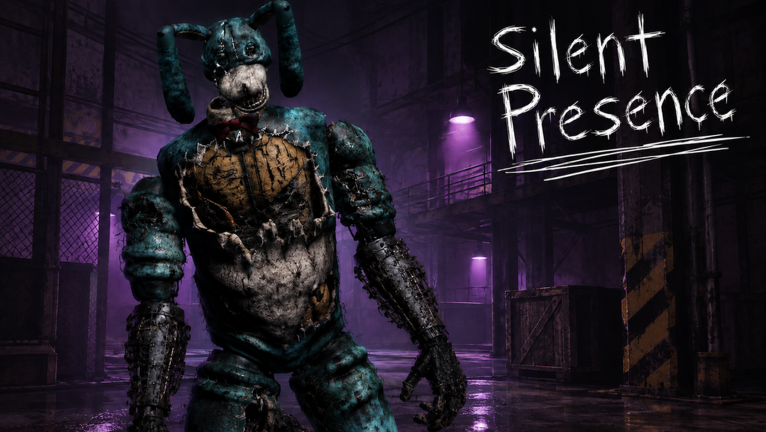
Welcome to night one
Silent Presence is a Roblox asymmetrical survival horror experience in BETA, built by [ME] Production (Kolyn4ik45 & 217dog). The pitch is simple and mean: one player becomes the monster, everyone else hides, listens, and tries to outlast a foggy night. Servers support up to 10 players, avatars use MorphToR6, and the official line still reads like a threat — They’ve been waiting for you.
This guide gets you from “I just searched the name” to a clean first session. Pair it with Controls and How to Survive once you understand the loop.
Step 1 — Open the real place
Use the official experience, not a lookalike Silent Psycho or Silent Mansion listing:
- Open Silent Presence on Roblox.
- Favorite and Like so updates surface in your feed.
- Join with friends when you can — social nights are how the game is marketed and how callouts actually work.
- Bookmark the [ME] Production group](https://www.roblox.com/communities/17264940) via the Official Links hub for announcements.
If search results feel noisy, confirm the place ID ends in 79301883261704 and the creator group is [ME] Production.
Step 2 — Expect BETA roughness
Silent Presence is explicitly labeled [BETA] and the description warns that a huge rework with brand-new mechanics is landing — small bugs may appear. That is not a forum excuse; it is the live product state as of September 2026.
Practical expectations:
- Mechanics can shift between sessions — skim rework notes after any long break.
- Do not assume every YouTube clip matches the current build.
- Report exploiters through the community channels the developers mention; do not “fight fire with scripts.” See the Scripts Hub.
Step 3 — Understand the two seats
| Role | Job | Mindset |
|---|---|---|
| Survivor | Hide, listen, regroup, outlast the night | Quiet feet beat heroic sprints |
| Monster | Hunt, cut rotations, create panic | Pressure is a resource — spend it wisely |
You will play both over a long night of rotating rounds. Read How to Play as the Monster before you treat the scary seat like a free highlight reel, and keep the entity tier list handy once you care about matchups.
Step 4 — First-session checklist
- Headphones on. Forest audio is the real HUD. Details live on Controls.
- Graphics high enough to read fog and silhouettes, without frying a potato device mid-chase.
- Voice chat discipline. Call calmly; screaming tells the monster where the stack is.
- Do not open every dark lane alone on night one — learn dens with friends.
- Die once without tilting. Ask whether panic or the killer’s pressure ended the round.
Step 5 — Meet the credited killers (names only for now)
Official credits currently highlight:
- Nosey & Bon — GENTOI
- Elberr — EddyGar on YouTube
Deep dives: Elberr, Nosey, Bon. Community chatter also mentions Verity and multiple maps — treat those as reported, not confirmed, until credits or patch notes say otherwise (Updates).
Step 6 — Badges and side goals
- Welcome — common “you joined” style badge.
- Snake Master — “You beat the Snake Minigame!” and extremely rare in public stats. Do not derail friends’ nights chasing it until you read the snake guide.
Step 7 — Codes and cosmetics
As of September 2026 there are no verified promo codes. When drops appear, redemption steps will live on the Codes Hub. Never buy “code lists” from random Discord DMs.
A clean first hour plan
| Minutes | Focus |
|---|---|
| 0–10 | Join, favorite, settings, headphones |
| 10–30 | Two survivor rounds practicing quiet movement |
| 30–45 | One monster round after skimming the monster guide |
| 45–60 | Review deaths, open one killer page, queue again |
Common beginner mistakes
- Confusing Silent Presence with older “Silent *” horror titles
- Sprinting the moment anything moves in fog
- Ignoring the rework warning and blaming “lag” for every new mechanic
- Installing scripts after one bad night (Scripts Hub)
- Solo queueing when your friends are online — the game is built for shared nights
What to read next
- How to Survive
- Controls & Settings
- Players Hub
- Tier List Hub
- Guides Hub for the full library
Survive the tutorial night. Then start hunting mastery.
Frequently Asked Questions
Quick answers for Silent Presence Roblox nights.
Is Silent Presence free on Roblox?
Yes — it is a free Roblox experience. Optional gamepasses or products may exist later; this wiki does not invent paid lists.
Can I play solo?
You can join alone, but the experience is designed around friends. Social callouts make survivor nights far more readable.
Where do I report exploiters?
Use the community server / group channels referenced by [ME] Production. Do not counter-cheat — see the Scripts Hub.
What should I open after this guide?
Read How to Survive and Controls, then skim Elberr before your next queue.